
Key Takeaways
- Free tools like Google Search Console, Google Keyword Planner, and AlsoAsked cover the basics and should be active for every site, regardless of what else you pay for.
- Budget tools like Mangools KWFinder and SE Ranking give you credible keyword difficulty scores and competitive data at a fraction of the cost of Ahrefs or Semrush.
- Ahrefs and Semrush are the two premium tools worth serious investment; Ahrefs wins on accuracy and click data, Semrush wins on database size and intent classification.
- Choosing a keyword research tool based on a feature list alone is a mistake; match the tool to your domain authority, budget, and how you actually research day-to-day.
- No tool replaces manually reviewing the SERP before targeting any keyword; difficulty scores are estimates, not guarantees.
Most SEOs spend more time debating which keyword research tool to buy than actually doing keyword research. The debate is mostly pointless. The tool does not rank your pages. The strategy you build with the tool does.
That said, using the wrong tool for your situation costs you more than money. A free tool with capped data can cause you to target keywords that are either far too competitive for your domain or far too obscure to drive meaningful traffic. A premium tool with features you do not understand gives you a false sense of doing thorough research when you are only using 15% of what it can do. I have watched both mistakes play out across client projects at every budget level.
After seven years of SEO work across ecommerce, SaaS, B2B, and local service sites, I have used nearly every keyword research tool on this list in real project contexts. This is not a feature comparison lifted from product pages. It is an honest breakdown of what each tool actually does well, what it misses, and which type of site or SEO practitioner it fits best.
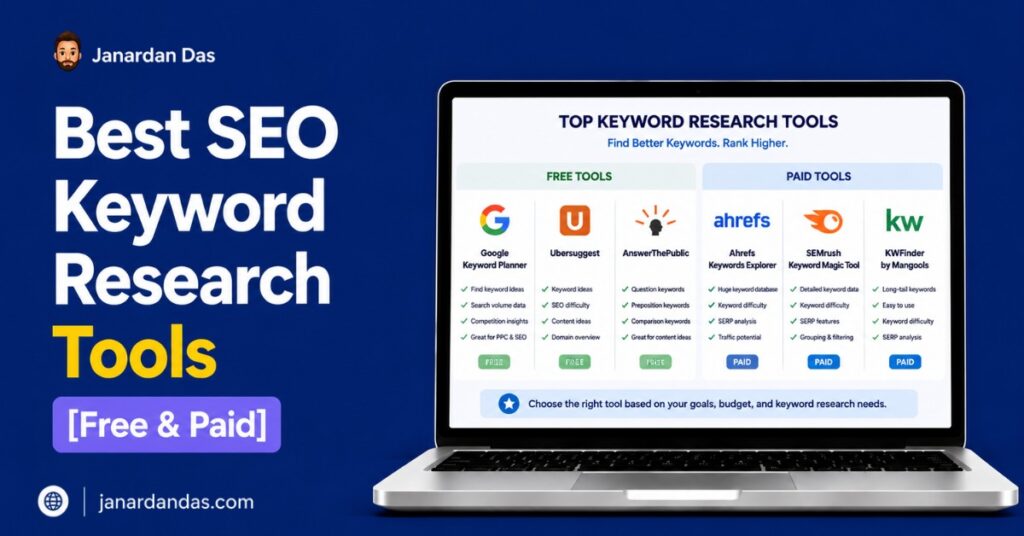
The 20 tools here are organized by price tier: free tools, budget tools under $100/month, and premium tools above $100/month. Within each tier, tools are ranked by how often I actually reach for them relative to alternatives at the same price point.
Best Free SEO Keyword Research Tools (Zero Cost, Real Value)
Free keyword research tools get unfairly dismissed. Google Search Console alone has surfaced more actionable keyword opportunities for my clients than any paid tool’s automated reports. The ceiling on free tools is real, but so is the floor: the tools in this section are not placeholders until you can afford something better. They belong in a permanent research workflow at any budget level.
1. Google Search Console
Google Search Console is the most underused free keyword research tool available. It shows you every query your pages are currently generating impressions for, directly from Google’s own data, which no third-party tool can replicate because they are all estimating from crawls and sampling panels.
The keyword research move most site owners miss: go to Performance, filter by Impressions, and sort by CTR ascending. Every keyword with high impressions and a CTR below 3% is a page Google is already surfacing but not fully trusting. That is your optimization list. Work through those pages before creating new content, and you will almost always see faster traffic gains.
For sites ranking between positions 8 and 20 for any term, GSC shows exactly which keywords are sitting on the edge of page one. That is where targeted on-page improvements deliver the fastest return. If you are not running this analysis monthly, you are leaving wins on the table. It is one of the first things I look at during any SEO consulting engagement before touching anything else.
Best for: Any site with existing traffic. Identifying quick-win keyword optimizations on pages already generating impressions.
Limitation: Shows data only for your own site. Useless before your site has any search presence.
Pricing: Free with a Google account.
2. Google Keyword Planner
Google Keyword Planner is free, pulls data from Google’s actual advertising infrastructure, and is the only tool that shows you Google-native keyword volume estimates without any third-party modeling layer. The main complaint is that volume data appears in broad ranges (1K-10K) rather than exact numbers unless you run an active Google Ads campaign. That is worth acknowledging, but it should not be a dealbreaker for most research use cases.
Two features here that paid tools do not fully replicate: first, you can enter a competitor’s URL and Google will suggest keywords it believes are relevant to that specific page, surfacing terms you might never have thought to search for directly. Second, the CPC and advertiser competition data tells you where commercial intent is concentrated in any niche. High CPC keywords signal topics where buyers are active, which usually means organic ranking for those terms drives revenue, not just traffic.
I use GKP at the start of most projects to build an initial keyword universe before moving into Ahrefs or Semrush for more precise competitive metrics.
Best for: Initial keyword ideation, URL-based competitor keyword discovery, identifying commercial intent signals from Google’s own ad data.
Limitation: Volume data shown as ranges, not exact numbers, without an active Ads campaign.
Pricing: Free with a Google account.
3. Google Trends
Google Trends answers a question no other keyword research tool addresses well: Is interest in this keyword growing, declining, or holding steady? Volume estimates from Ahrefs and Semrush show what a keyword has averaged over the past twelve months. Trends show you the direction, and direction matters enormously for deciding whether to invest in a topic now or six months from now.
Before committing to any content cluster or pillar page, run the primary keyword through Google Trends over a five-year window. A keyword with stable or rising interest is worth building toward. A keyword with a three-year decline is a depreciating asset regardless of its current volume number. For seasonal topics, Trends tells you exactly when to publish so that content is indexed and gaining authority before peak season search demand hits.
The “Related queries” Rising tab is one of the most underused features in all of keyword research. It surfaces emerging search terms before they appear in any tool’s database, because Trends reflects real-time behavior rather than historical crawls. Finding a term six months before it enters competitor databases is a real first-mover advantage.
Best for: Validating keyword trend direction, timing content publishing for seasonal topics, and discovering emerging terms before they show up in paid tools.
Limitation: Shows relative interest, not absolute search volume.
Pricing: Free.
4. AnswerThePublic
AnswerThePublic pulls autocomplete data from Google and Bing and organizes it into question-format categories: who, what, when, where, why, how, and comparison phrases. The visual wheel format works well in presentations. The downloadable CSV is what most practitioners actually use.
The real value is content architecture. When I am building a topical cluster on any subject, AnswerThePublic is one of the first stops because it shows the full spectrum of questions people are searching at every sophistication level, from beginner questions to specific technical queries. That map becomes the H3 structure for long-form articles and the FAQ section that earns featured snippets.
The free version gives you three searches per day, which is limiting for heavy research sessions but sufficient for occasional ideation. The paid plan removes the cap and adds trend comparison data over time.
Best for: Content ideation, FAQ generation, structuring articles to capture People Also Ask boxes and featured snippets.
Limitation: Three searches per day on the free plan. No search volume data without the paid plan.
Pricing: Free (3 searches/day). Paid plans from $11/month billed annually.
5. AlsoAsked
AlsoAsked maps the relationship between People Also Ask questions, not just what questions exist, but which questions trigger further questions inside Google’s PAA boxes. That hierarchy is directly useful for article structure in a way that a flat question list is not.
If PAA shows that “what is keyword research” leads to “how do you do keyword research” which leads to “what tools do you use for keyword research,” that is Google showing you the sequence of sub-questions your article needs to answer. Following that sequence produces content that matches how readers think through a topic, and Google tends to surface content that mirrors real reader intent progression.
Best for: Structuring long-form content to capture PAA features, identifying the logical question flow readers follow on any topic.
Limitation: Focused specifically on PAA data. Does not provide search volume or keyword difficulty metrics.
Pricing: Free (limited). Paid plans from $15/month.
6. Keyword Surfer
Keyword Surfer is a free Chrome extension from Surfer SEO that overlays keyword data directly onto Google search results. When you run any search, you see estimated monthly search volume for that query, a list of related keyword suggestions in the sidebar, and estimated organic traffic for every page in the top 10.
The top-10 traffic estimates are useful for a quick competitive assessment. Before opening a keyword research tool and running a full analysis, a glance at the Keyword Surfer sidebar tells you whether the pages currently ranking are getting meaningful traffic or whether even a position-one ranking would not move the needle. That two-second check saves time on keywords not worth pursuing.
Best for: In-SERP keyword research without switching tools, and quick competitive traffic estimates while browsing.
Limitation: The data is less precise than Ahrefs or Semrush. No keyword difficulty scoring.
Pricing: Free.
7. Keywords Everywhere
Keywords Everywhere is a browser extension that adds keyword data to Google, YouTube, Amazon, Bing, and a dozen other platforms simultaneously. Search anything on Google and you see monthly search volume, CPC, and competition score alongside the results without opening a separate tab.
The credit system, rather than a monthly subscription, is the distinguishing factor for this tool. Credits do not expire. For a researcher who does intensive keyword work a few times per month rather than daily, the credit model is significantly cheaper than any subscription product covering the same functionality.
The bulk keyword analysis feature lets you paste up to 100,000 keywords and get volume, CPC, and trend data back in one export, faster than running the same list through most subscription tools.
Best for: Researchers who want keyword data in context across multiple platforms. Light users who prefer pay-as-you-go over monthly subscriptions.
Limitation: Data quality does not match Ahrefs or Semrush. Credits deplete based on usage volume.
Pricing: Credit-based. 100,000 credits for $10. Credits never expire.
8. Soovle
Soovle shows autocomplete suggestions from Google, YouTube, Amazon, Wikipedia, Bing, Yahoo, and Ask simultaneously in one interface. Type a keyword and you see platform-specific suggestions laid out side by side.
The practical insight from using Soovle regularly: a keyword appearing in both Google and YouTube autocomplete signals intent that works across content formats, meaning both a written article and a video have real search demand behind them. A keyword appearing only in Amazon suggests purchase intent over research intent, which changes both the content format and the monetization approach.
Best for: Multi-platform keyword ideation, identifying cross-format content opportunities at zero cost.
Limitation: No volume data, difficulty scores, or competitive metrics.
Pricing: Free.
Best Budget SEO Keyword Research Tools (Under $100/Month)
Budget keyword research tools have improved significantly. Several options in this tier now deliver data quality that would have been considered premium-only a few years ago. If you are running a small to medium site, managing a handful of client accounts, or doing SEO as part of a broader marketing role rather than as a full-time specialty, the tools here give you what you need without the overhead of an enterprise platform.
9. Mangools KWFinder
KWFinder is the best keyword research tool for its price point, and it is the tool I recommend most often to clients who want reliable data without Ahrefs pricing. The keyword difficulty score is among the most accurate in this tier. The SERP overview panel shows you the exact pages currently ranking for any keyword alongside their domain authority, backlink count, and estimated monthly traffic, all from one view without switching tools.
Where KWFinder genuinely stands out: local keyword research. You can filter results by city, region, or country with precision that most tools reserve for higher price tiers. For local service businesses targeting neighborhood-level or city-level keywords, that specificity changes what you prioritize. A plumber targeting Manchester needs different keyword data than a plumber targeting the broader UK market, and KWFinder handles both without requiring enterprise-level spend.
The Mangools suite includes KWFinder, SERPChecker, SERPWatcher for rank tracking, LinkMiner for backlink analysis, and SiteProfiler. For a comprehensive workflow at a budget price, nothing in this tier competes with the breadth of that package.
Best for: Beginners, bloggers, and local businesses who want reliable keyword difficulty data and competitive SERP analysis without Ahrefs pricing.
Limitation: The keyword database is smaller than that of Ahrefs or Semrush. Less suitable for large-scale enterprise research.
Pricing: Starts at $29.90/month billed annually.
10. SE Ranking Keyword Research Tool
SE Ranking has built one of the strongest mid-market platforms for agencies. The keyword research module covers search volume, difficulty, CPC, and competition data, with SERP history showing how rankings for any keyword have shifted over time. That historical SERP view is useful when you want to understand whether a keyword’s ranking landscape is stable or volatile before investing content resources in it.
The Keyword Grouper is SE Ranking’s most distinctive feature. It automatically clusters keyword lists by semantic similarity and search intent, reducing the manual work of organizing hundreds of keywords into content buckets. For agencies managing five or more client sites, automating that grouping step saves meaningful time each month.
The white-label reporting feature, which most tools in this price range do not include, makes SE Ranking a practical choice for freelancers and small agencies presenting keyword research and ranking reports to clients under their own brand.
Best for: Agencies and freelancers managing multiple clients who want keyword research integrated with reporting and rank tracking in one platform.
Limitation: Data volume does not match Semrush at the enterprise level. Some advanced features require higher-tier plans.
Pricing: Starts at $65/month.
11. Serpstat
Serpstat is a full SEO platform with solid keyword research functionality, including a “Search Questions” feature that pulls question-format keywords directly from search data. The Cluster Research tool groups keywords by shared SERPs, identifying which keywords have the same pages ranking for them. That is a methodologically sound basis for content clustering because it reflects how Google actually categorizes intent rather than relying on algorithmic keyword similarity alone.
The competitive keyword analysis is one of the strongest features at this price point. Enter any competitor’s domain and see every keyword they rank for, segmented by position range, traffic estimate, and keyword difficulty. That data feeds directly into a gap analysis without requiring manual cross-referencing between multiple tools.
Best for: Teams wanting a Semrush alternative at a lower price point, particularly for keyword clustering and competitor keyword gap analysis.
Limitation: Some keyword volume data is less precise than Ahrefs or Semrush on niche or low-volume terms.
Pricing: Starts at $59/month.
12. Long Tail Pro
Long Tail Pro was built specifically for long-tail keyword research, which is the right starting point for new or low-authority sites. The Keyword Competitiveness (KC) score incorporates domain authority, page authority, and internal link counts for the pages currently ranking, giving a more nuanced competition estimate than tools that base difficulty purely on raw backlink counts.
The filtering is where Long Tail Pro earns its place. You can filter by minimum keyword length to focus on multi-word phrases, set KC thresholds, and sort by search volume to surface exactly the low-competition, specific-intent keywords that newer sites can realistically rank for within six to twelve months.
One thing I tell new site owners consistently: resist targeting head terms in the first year. Long Tail Pro makes it easy to find the specific terms you can rank for now, build traffic, and build domain authority before moving up the difficulty ladder.
Best for: New sites and bloggers targeting long-tail keywords where ranking is achievable without a high domain authority or large backlink profile.
Limitation: Less suited for enterprise-scale research or established sites that can now target more competitive terms.
Pricing: Starts at $59.99/month.
13. SpyFu
SpyFu is a competitive intelligence tool where keyword research is tied directly to what your competitors are doing in both organic and paid search. Enter any competitor’s domain and see every keyword they have ever ranked for organically, including historical rankings going back years, plus every Google Ads keyword they have bid on with estimated monthly spend.
The historical organic data is something most tools in this tier do not offer. A competitor that ranked for a keyword cluster in 2022 but dropped off in 2024 is worth investigating. Did difficulty increase? Did intent shift? Did they stop updating the content? Understanding why a ranking disappeared tells you whether the opportunity is still real or whether conditions have changed since.
For organic SEOs, the paid keyword data is one of SpyFu’s most underrated features. If a competitor is spending meaningful budget on ads targeting a specific keyword, that keyword drives conversions, not just traffic. Those are the terms worth building organic rankings for.
Best for: Competitor keyword intelligence, identifying commercially valuable keywords through paid search data signals.
Limitation: Primary strength is competitor analysis rather than broad keyword ideation from scratch.
Pricing: Starts at $39/month.
14. Wordtracker
Wordtracker pulls keyword data from Google, YouTube, and Amazon, making it one of the few tools in this price range that explicitly surfaces cross-platform keyword differences. For ecommerce SEO specifically, the Amazon keyword data adds a purchase-intent layer that Google-only tools miss.
A buyer searching “best waterproof hiking boots” on Google is researching. A buyer searching “waterproof hiking boots size 10 mens” on Amazon is ready to purchase. Those are different intent signals leading to different content decisions, and Wordtracker makes that cross-platform comparison accessible at a budget price. When I work on e-commerce SEO projects, Amazon keyword data frequently surfaces product-level terms that drive higher-converting traffic than equivalent Google search terms.
Best for: E-commerce brands and consultants who want to understand keyword intent across Google and Amazon in a single tool.
Limitation: Smaller database and fewer features than Semrush or Ahrefs for pure Google organic research.
Pricing: Starts at $27/month. 7-day free trial available.
15. Ubersuggest
Ubersuggest is the most accessible entry point into paid keyword research. The free tier gives you limited daily searches with basic volume, difficulty, and CPC data. Paid plans unlock historical data, more daily searches, and a Content Ideas section showing top-performing pages for any keyword sorted by estimated traffic and social shares.
The data precision does not match Ahrefs or Semrush at scale, and the keyword difficulty scores can be inconsistent on highly competitive terms. But for a personal blog, a small business site, or someone doing SEO part-time without needing enterprise-level precision, Ubersuggest covers the fundamentals cleanly at a price that is hard to argue with.
The one-time lifetime license at $290 is worth considering for budget-conscious users who want a permanent tool without ongoing monthly costs.
Best for: Beginners and part-time SEOs who want a simple interface and basic keyword metrics without a subscription commitment.
Limitation: Data precision and database size do not compete with premium tools. Difficulty scores less reliable on competitive terms.
Pricing: Free (limited). Paid plans from $29/month, or $290 one-time lifetime license.
16. Keywordtool.io
Keywordtool.io generates keyword suggestions from Google Autocomplete, YouTube, Bing, Amazon, eBay, and App Store search data in one interface. The free version shows keyword ideas without volume or CPC data. Paid plans unlock the full metrics.
The YouTube keyword data is the strongest feature in the budget tier for video-first content strategies. Most traditional keyword tools treat YouTube as secondary. Keywordtool.io surfaces YouTube autocomplete terms as a primary data source, which matters when your audience actively uses YouTube to research topics in your niche. Keywords appearing in YouTube autocomplete but not prominently in Google tools represent video content gaps your competitors may not have mapped yet.
Best for: Content teams with a YouTube or video content strategy who need platform-specific keyword data beyond Google search.
Limitation: Full data requires a paid plan starting at $89/month, placing it at the upper end of the budget tier.
Pricing: Free (keywords only, no volume). Paid plans from $89/month for full metrics.
Best Premium SEO Keyword Research Tools (Serious Investment, Serious Data)
Premium keyword research tools justify their cost when you are managing SEO at a scale where incomplete or imprecise data leads to meaningful revenue loss. If you are running a site at 50K or more monthly organic sessions, managing multiple client accounts, or making content investment decisions based on keyword potential, the accuracy and depth of premium tools pays for itself. If you are running a small blog on the side, it almost certainly does not.
17. Ahrefs Keywords Explorer
Ahrefs Keywords Explorer is the tool I reach for first on any new project, and it is the benchmark most SEOs measure alternatives against. The keyword difficulty (KD) score is one of the most accurate in the industry because it is based on the median number of referring domains pointing to the top-10 ranking pages, a transparent and replicable methodology. More importantly, Ahrefs shows estimated monthly clicks alongside search volume, a distinction that significantly changes how you prioritize keywords.
A keyword with 8,000 monthly searches but a featured snippet capturing 60% of clicks may only deliver 1,200 clicks to all organic results combined. A keyword with 3,000 monthly searches and no SERP features might deliver 2,400 clicks to the top five results. The clicks metric shows you the real opportunity, not the headline volume number.
The “Traffic Potential” metric is one of Ahrefs’ most practical features. Rather than showing traffic for a single keyword, it shows the total traffic the top-ranking page for that keyword receives from all the queries it ranks for. This tells you whether the topic has a long tail of related terms driving additional traffic beyond the primary keyword, which is frequently true for well-ranking pages on broad topics.
Keyword Ideas and Cluster Building in Ahrefs
From any seed keyword, Ahrefs generates ideas across six tabs: Matching terms, Related terms, Search suggestions, Also rank for, Also talk about, and Newly discovered. The “Also rank for” tab is particularly useful for cluster building because it shows every other keyword the top-ranking pages for your seed term also rank for. That is the organic keyword cluster Google has already validated, telling you exactly what related terms belong in your content.
The Parent Topic feature identifies whether Google treats your keyword as a standalone topic or as a sub-topic of a broader query. If two keywords share the same Parent Topic, you can likely rank both with a single page rather than creating separate content for each. That one insight alone has saved clients a significant content production budget.
Competitive Gap Analysis in Ahrefs
Ahrefs’ Content Gap tool takes competitive gap analysis further than most tools. Enter your domain and up to ten competitors, and it identifies every keyword your competitors rank for in the top 10 that you do not rank for at all. Filter by keyword difficulty and traffic potential to prioritize which gaps are worth closing first, and sort by the number of competitors ranking to identify terms where multiple rivals have an established presence that you need to address.
Best for: Intermediate to advanced SEOs running content strategies, competitive research, and traffic-click gap analysis at scale.
Limitation: No free plan. The $7 trial gives 7 days of access, but the full value of Ahrefs takes meaningful time to explore properly.
Pricing: Starts at $129/month. 7-day trial available for $7.
Database: 28+ billion keywords across 10 search engines.
18. Semrush Keyword Magic Tool
Semrush’s Keyword Magic Tool has the largest keyword database of any tool on this list at over 25 billion keywords, which matters when you are doing broad topical research and want to map an entire subject area comprehensively before creating a single piece of content. The database size means Semrush surfaces long-tail and niche variations that smaller databases miss entirely.
The topic group sidebar automatically clusters keyword ideas from any seed term into thematic groups, speeding up keyword organization significantly. Instead of manually sorting 2,000 keyword ideas into content buckets, Semrush groups them by topic so you can see clusters at a glance and prioritize entire subject areas rather than individual terms one by one.
Intent Classification and Commercial Research in Semrush
Semrush classifies every keyword by intent: Informational, Navigational, Commercial, or Transactional. That classification is built into the main keyword table and filterable, meaning you can isolate every transactional keyword in a category and immediately know which terms to prioritize for product and service pages versus blog content. For teams publishing at scale, this saves the step of manually assessing intent for each term.
For paid search intelligence, Semrush is the strongest premium tool on this list. The Advertising Research module shows every keyword any competitor is bidding on, their estimated spend, and the ad copy they are running. For organic SEOs, that data is a signal map for which keywords drive conversions in any niche.
Keyword Gap and Position Tracking in Semrush
Semrush’s Keyword Gap tool compares your domain against up to four competitors simultaneously and shows every keyword they rank for that you do not, segmented by keyword type: unique to one competitor, shared by multiple, or missing across all competitors. The “Missing” filter, showing keywords all your competitors rank for but you do not, is where the highest-priority gap opportunities surface.
Best for: Topical mapping at scale, competitor keyword gap analysis, and combining organic and paid search intelligence in one platform.
Limitation: Interface complexity creates a real learning curve for beginners. Full value requires time to understand which reports serve which research purposes.
Pricing: Starts at $139.95/month. Limited free access available.
Database: 25+ billion keywords.
19. Moz Keyword Explorer
Moz Keyword Explorer introduced a Priority Score that combines search volume, keyword difficulty, and organic CTR into a single number designed to surface keywords where real opportunity exists, not just where volume looks impressive. The underlying logic is sound: a high-volume keyword where ads absorb most clicks is less valuable than a lower-volume keyword with high organic CTR, and Moz surfaces that distinction more directly than most tools.
The Organic CTR metric estimates what percentage of searchers for any keyword actually click on organic results versus ads, featured snippets, or other SERP features. That data directly affects whether a volume-strong keyword is worth pursuing from an organic standpoint, and having it built into the primary keyword table saves a step.
Moz is also the originator of Domain Authority (DA), still the most widely cited domain-level metric in the industry. If you are in an agency context where clients or stakeholders reference DA in conversations, Moz being your primary platform creates direct alignment between your research data and the metric language your audience already understands.
Best for: Agencies using Moz Pro who want keyword data integrated with domain authority tracking, and teams where DA is the shared language for authority discussions with clients.
Limitation: The keyword database smaller than Ahrefs or Semrush. Difficulty scores less precise on highly competitive terms.
Pricing: Starts at $49/month. Free 30-day trial available.
20. Majestic SEO (Search Explorer)
Majestic is primarily a backlink analysis platform, and the Search Explorer keyword feature is not a standalone keyword research product. It surfaces keyword data tied to link equity and topical relevance signals, which is a different lens than volume and difficulty scores.
Majestic is specifically useful in a keyword research workflow: when you are doing link building and want to understand the topical context of a competitor’s high-authority pages before pitching them as link targets. Knowing which keywords a page is built around, alongside its Trust Flow and Citation Flow data, helps you assess whether a link from that page will reinforce your topical authority signals or dilute them.
This is a specialist tool for SEOs who treat keyword targeting and link building as connected activities rather than separate workflows. If you are working on a link building campaign and want to align anchor text strategy with keyword priorities, Majestic adds a layer that Ahrefs and Semrush handle less precisely.
Best for: Advanced SEOs connecting keyword strategy to link building campaigns who want topical relevance context alongside backlink metrics.
Limitation: Not a primary keyword research tool. Should be used alongside Ahrefs or Semrush rather than as a replacement.
Pricing: Starts at $49.99/month.
How to Choose the Right SEO Keyword Research Tool for Your Situation
The right keyword research tool is not the one with the best feature list. It is the one you will use consistently that gives you accurate enough data for your current scale, and that fits your budget without creating pressure to cancel when revenue dips.
New sites with low domain authority should prioritize finding keywords they can actually rank for, not keywords that look impressive on a spreadsheet. KWFinder or Long Tail Pro give you reliable difficulty scoring at a price that makes sense before your site is generating revenue. Pair either with Google Search Console from day one, even before you have meaningful traffic, because GSC data compounds over time.
Established sites managing content at scale need Ahrefs, Semrush, or both. Ahrefs is stronger for keyword research accuracy and click data. Semrush is stronger for database breadth and intent classification. Most serious SEO teams end up with access to both. If you can only choose one, Ahrefs is my default recommendation for keyword research specifically.
Local businesses and local SEO consultants should weigh local keyword filtering more heavily than database size. KWFinder’s local targeting is the strongest in the budget tier. Semrush also has solid local keyword features at the premium level. What matters for local research is not how many global keywords a tool indexes but how precisely it can surface intent at the city and neighborhood level.
Ecommerce brands need cross-platform keyword visibility. Google keyword data shows what people are researching. Amazon keyword data shows what people are ready to buy. Wordtracker covers both at a budget price. At the premium tier, Semrush’s Amazon integration adds that purchase-intent dimension to an already comprehensive platform. This is something I look at specifically during e-commerce SEO projects because purchase-intent keyword gaps on Amazon often translate directly into product page opportunities on your own site.
One thing that does not change regardless of tool choice: no keyword research tool replaces manually reviewing the SERP for any keyword you are seriously considering targeting. Difficulty scores are estimates built on proxy metrics. The actual SERP shows you what content formats are winning, whether Google is serving local packs or featured snippets, and whether the intent behind a keyword is actually what you assumed when you searched for it. Spend the two minutes before committing to a content investment.
Conclusion
Keyword research tools are only as useful as the strategy behind how you use them. Google Search Console and Google Keyword Planner together give you more insight than most people extract from tools costing ten times as much. Add one focused paid tool matched to your budget and site stage, and you have a workflow that actually moves traffic without overspending on features you will not use.
The next step is concrete: open Google Search Console, filter your Performance report by Impressions descending and CTR below 5%, and look at the first twenty keywords on that list. Those are your optimization targets. Work through those existing pages before you build anything new.
Frequently Asked Questions
What is the best SEO keyword research tool overall?
Ahrefs Keywords Explorer is the best all-around keyword research tool for most SEOs. It provides accurate keyword difficulty scores, click data that goes beyond raw search volume, and cluster-building features like Parent Topic and Traffic Potential that competitors do not match at the same precision level. For teams that also need the largest possible keyword database and built-in intent classification, Semrush is the stronger choice.
What is the best free keyword research tool?
Google Search Console is the best free keyword research tool for any site with existing traffic, because it shows actual query data from Google directly. For sites with no existing traffic, Google Keyword Planner is the best starting point. Both are free, both pull from Google’s own infrastructure, and both provide insights no third-party tool can fully replicate.
Is Ahrefs or Semrush better for keyword research?
Ahrefs is generally stronger for keyword research accuracy, particularly on click data and keyword difficulty scoring. Semrush has a larger keyword database and better keyword intent classification built directly into the keyword table. If you can only afford one, Ahrefs is the better choice, specifically for keyword research. If you also need competitor ad intelligence and a broader marketing platform, Semrush offers more within a single subscription.
What is keyword difficulty, and how accurate is it?
Keyword difficulty (KD) is a score from 0 to 100 that estimates how hard it would be to rank a new page in the top 10 for a given keyword. Each tool calculates it differently, usually based on the number and quality of backlinks pointing to the current top-ranking pages. No tool’s KD score is perfectly accurate because ranking is influenced by many factors beyond links, including content quality, topical authority, and search intent alignment. Always verify difficulty by manually reviewing the SERP before making content decisions.
Can I do keyword research without a paid tool?
Yes. A workflow using Google Search Console, Google Keyword Planner, Google Trends, AnswerThePublic (three free daily searches), AlsoAsked, and Keyword Surfer covers the fundamentals at zero cost. The limitations are real: volume data is less precise, database depth is smaller, and competitive metrics are limited. But many sites have built meaningful organic traffic using only free tools before graduating to paid alternatives when the ROI becomes clear.
How many keywords should I target per page?
Target one primary keyword per page and three to ten semantically related secondary keywords. The goal is to cover one specific topic completely, not to pack multiple distinct intents into a single page. If two keywords have similar intent and show the same pages ranking in the SERP, one page can target both. If the SERPs are substantially different, each keyword warrants its own dedicated page.
What is the difference between search volume and traffic potential?
Search volume is the estimated number of times a specific keyword is searched per month. Traffic potential is the total organic traffic a well-ranking page for that keyword receives across all the queries it ranks for, not just the primary keyword. Ahrefs surfaces this distinction directly through its Traffic Potential metric. A keyword with 2,000 monthly searches might have a Traffic Potential of 12,000 if the top-ranking page also captures traffic from dozens of related terms. Traffic Potential is the more useful number for forecasting real content impact.
What is a long-tail keyword?
A long-tail keyword is a specific, multi-word search phrase with lower monthly search volume but higher intent specificity. “Keyword research” is a head term. “How to do keyword research for a new e-commerce site” is a long-tail keyword. Long-tail keywords typically have lower competition, higher conversion rates because the searcher has a precise need, and are more achievable for new or low-authority sites. The term comes from the shape of search volume distribution: thousands of specific phrases with modest individual volume that collectively drive more traffic than a handful of high-volume head terms.
Should I use more than one keyword research tool?
Most experienced SEOs use two to three tools because each has different data sources and different strengths. A practical combination: Ahrefs or Semrush as the primary tool, Google Search Console for existing site data, and AnswerThePublic or AlsoAsked for content ideation. Adding more tools beyond that produces diminishing returns unless you have a specific need, such as local research, Amazon keyword data, or competitor ad spend intelligence, that justifies a specialized tool.
How often should I do keyword research?
Do full keyword research before creating any new content. Beyond that, run a quarterly review using Google Search Console to identify pages losing position (candidates for content refresh) and pages with high impressions but low CTR (candidates for title and meta description optimization). After major Google algorithm updates, re-check your ranking positions for primary keywords because intent shifts and ranking volatility sometimes open new opportunities that were not there before.
Is keyword research still relevant with AI search and Google AI Overviews?
Yes, and arguably more so. Google’s AI Overviews and generative tools like ChatGPT pull from pages that rank well organically and are structured to answer questions clearly. The content that gets cited in AI-generated responses is content built around real search intent, structured with clear headings, and written to answer specific questions directly. That is exactly what good keyword research produces. The mechanics of how you track success have shifted at the margins, but the fundamental exercise of identifying what people search for and building content around it remains as essential as it has ever been.
What is topical authority, and how does keyword research support it?
Topical authority is how Google assesses whether your site has deep, credible coverage of a subject area. A site with 40 well-researched articles on personal finance signals more expertise on that topic than a site with one article per broad category. Keyword research supports topical authority by helping you map the full landscape of subtopics, questions, and angles within a subject so you can plan content that covers the topic comprehensively. Tools like Ahrefs Keywords Explorer, Semrush Keyword Magic Tool, AnswerThePublic, and AlsoAsked all contribute to this mapping in different ways, and combining them gives you a more complete picture than any single tool alone.