
TL;DR
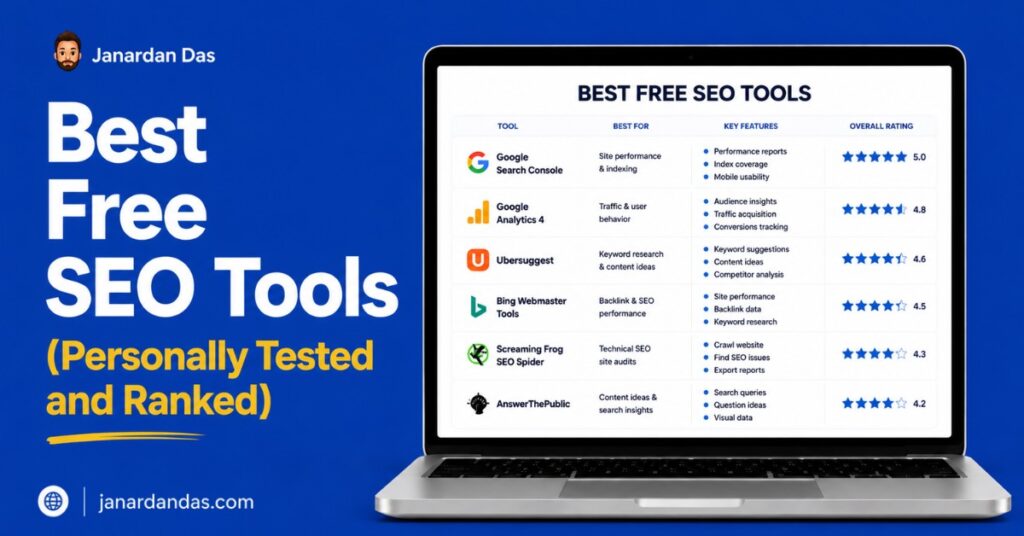
- Google Search Console is irreplaceable. It is the only tool that tells you exactly what Google sees, indexes, and credits on your site.
- Ahrefs Webmaster Tools is the best free backlink and audit tool available. Verify your site and set it up today.
- The competitor gap between a free and a $200/month SEO stack is smaller than most agencies want you to believe. You can build a genuinely capable free setup.
- The biggest mistake with free tools is using each one in isolation. Combining Search Console data with Screaming Frog crawl data, for example, surfaces issues neither tool catches alone.
- I have organized this list by use case and ranked each category so you can build a targeted stack rather than install everything at once.
I have been doing SEO for over five years. I have grown sites from zero to 150,000 monthly organic visitors and worked across eCommerce, B2B, and service-based businesses. In that time, I have tested more free SEO tools than I can count.
Most of them are not worth your time. Some are genuine alternatives to paid tools. A few are so good that I use them on paid client projects even when I have access to premium subscriptions.
This post covers only the free SEO tools I have personally used to solve a real problem and gotten a measurable result from. I have also ranked them within each category so you know where to start. No tool gets a spot just because it has a free plan.
Best Free SEO Tools for Keyword Research
The right free keyword research tools tell you what people are searching for, how competitive a keyword is, and whether you can realistically rank for it. You will not get the same depth as Ahrefs or Semrush at the paid tier, but the free options below are enough to build an intelligent content strategy.
1. Google Search Console
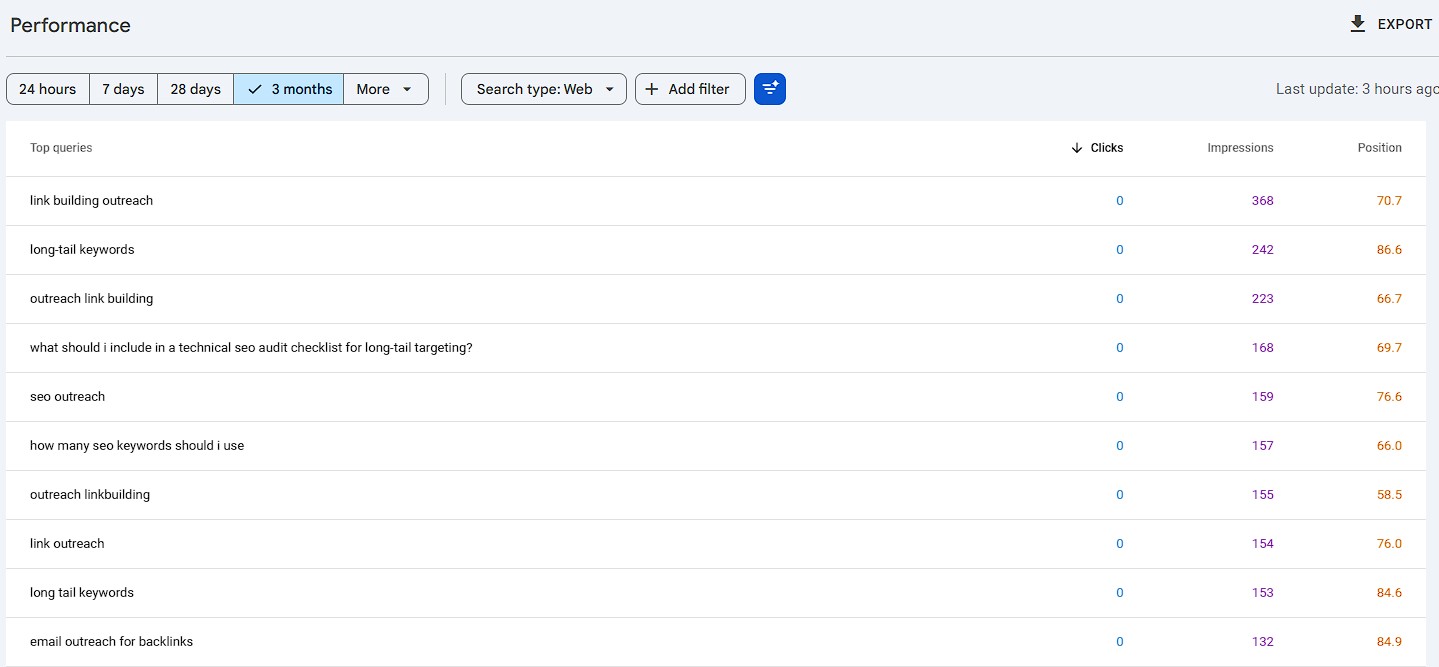
Best for: Finding keywords you are already close to ranking for
Search Console is not typically marketed as a keyword research tool. I use it as one every week.
Under the Performance report, every query your site has received impressions for is logged. Filter by “Queries” and sort by impressions. You will find keywords for which your pages are showing up, but not ranking high enough to capture clicks. These are your best quick-win opportunities because Google has already decided your content is relevant to those queries. You are not convincing Google of anything new. You are just improving what exists.
My specific workflow: export all queries with more than 100 impressions and fewer than 10 clicks. Sort by impressions descending. Any query where your page sits between positions 8 and 20 is a candidate for a title tag rewrite or a content depth update. I have moved pages from position 14 to position 4 with nothing more than a stronger title and an additional 300 words of specific content addressing the query better.
No other free tool gives you this data. It comes directly from Google and reflects what Google actually processes on your site.
2. Google Keyword Planner
Best for: Volume ranges and commercial intent validation
Keyword Planner lives inside Google Ads and is free with an account. The frustrating part: volume data shows as ranges (1K to 10K) unless your account has active ad spend. The useful part: the keyword ideas Google suggests for any seed term are directly tied to how Google categorizes content. That is valuable even without exact volume numbers.
Use Planner for two specific things. First, paste your primary keyword and look at the related terms it surfaces. These are the secondary keywords Google considers semantically connected to your topic. Use them in your H3 headings and body content to build topical coverage. Second, use the bid range as a proxy for commercial intent. A keyword with a suggested bid of $8 to $15 per click has high advertiser competition, which means people searching it are likely buyers or close to buying. That context shapes how you write the content.
To get precise volume data without running ads: set up an account, add a payment method, and pause everything. Some accounts unlock exact volumes within a few days of account activity. It does not work for everyone, but it costs nothing to try.
3. Google Trends
Best for: Validating seasonal demand and geographic interest before committing to a topic
Google Trends shows relative search interest over time, not absolute volume. That distinction matters a lot. A keyword with 10,000 monthly searches that is declining 40% year over year is a worse investment than a keyword with 2,000 searches that is growing 80%. Volume alone lies. Trends tells you the direction.
Before writing any piece of content targeting a keyword with a seasonal component, I check Trends to confirm the timing. “Gift ideas for dad” in February is wasted effort. The same piece published in April through May, when the trajectory is climbing toward Father’s Day, can rank and capture traffic at exactly the right time.
Most SEOs underuse the geographic filter. If you are doing local SEO or targeting a specific country, Trends shows whether a keyword is actually searched there, not just globally. A keyword that gets 90% of its searches in the US is not worth targeting if your audience is in the UK or India.
4. AnswerThePublic (Free Tier)
Best for: Question-based keyword discovery for FAQ and long-form content
AnswerThePublic pulls from Google autocomplete to show you the question variants, comparisons, and prepositions that real people type around any keyword. The free plan limits you to a handful of searches per day, but one well-chosen seed term generates enough content angles to plan an entire topic cluster.
The most practical use: building FAQ sections that target People Also Asked results. Enter your primary keyword, download the full list, and select the questions that reflect real decision points or common misconceptions in your niche. Answer those questions directly inside your content and you are writing to intent rather than hoping for it.
One tactic I use on client sites: run AnswerThePublic on the brand names of my client’s top competitors. The questions that surface tell you exactly what their customers are confused or concerned about, which is content your client’s site can answer better.
5. AlsoAsked
Best for: Mapping how topics connect in Google’s People Also Asked database
AlsoAsked pulls People Also Asked data and shows it as a branching tree. Where AnswerThePublic shows you questions in a flat list, AlsoAsked shows you how one question leads to the next. That structure is a direct map of how Google groups sub-topics within a broader subject.
Use it when planning topic clusters. If your pillar page covers “email marketing,” AlsoAsked will show you how Google branches that into sub-topics like deliverability, list building, automation, and open rates. Those branches become your cluster content pages. The architecture comes from Google’s own data, not guesswork.
6. Ahrefs Free Keyword Generator
Best for: Quick keyword difficulty checks and seed keyword expansion
The Ahrefs free keyword generator at ahrefs.com/keyword-generator returns keyword ideas, search volume estimates, and keyword difficulty (KD) scores for any seed term. You do not need an account.
KD scores range from 0 to 100. For a new site with a Domain Rating below 20, focus on keywords with a KD of 20 or lower. For an established site, you have more room to target up to 50 depending on your content quality. The free tool does not show full SERP data, but KD combined with volume gives you a fast filter for which keywords are even worth considering.
7. Ubersuggest (Free Tier)
Best for: Beginners who want keyword data, traffic estimates, and competitor insights in one place
Ubersuggest by Neil Patel gives you keyword ideas, volume, CPC, and limited competitor domain traffic data in one interface. The free plan is restricted to a few daily searches, so treat it as a supplementary tool rather than a primary research engine.
Where it adds value: the competitor analysis tab. Enter a competitor’s domain and see which keywords drive their organic traffic. The free tier limits the results, but the top 10 keywords for any competitor are visible and often enough to identify a traffic source you have not targeted yet.
Best Free On-Page SEO Tools
On-page SEO is the set of changes you make directly to a page to help Google understand its topic and show it to the right searchers. These tools handle everything from metadata editing to content readability.
8. Rank Math (Free WordPress Plugin)
Best for: On-page SEO management on WordPress, with schema markup included for free
Rank Math handles title tags, meta descriptions, canonical URLs, robots.txt, XML sitemaps, and on-page analysis from one plugin. The free plan includes schema markup for articles, FAQs, how-tos, and products, which its main competitor Yoast reserves for the paid tier.
Schema markup gives your pages eligibility for rich results in Google. FAQ schema can earn you an expandable FAQ block directly in the SERP, which visually dominates the result and increases CTR without ranking higher. For any content site targeting informational or how-to queries, Rank Math’s free FAQ schema is worth switching from Yoast for alone.
The on-page analysis tool grades your content against a target keyword and shows specific fixes: missing keyword in title, insufficient content length, no internal links, missing alt text. Use it as a checklist, not a score to optimize for. Google does not read Rank Math scores. It reads your content.
9. Yoast SEO (Free WordPress Plugin)
Best for: Established WordPress sites already on Yoast that want a reliable free option
Yoast handles the same core functions as Rank Math: title and meta editing, canonical tags, sitemaps, and basic on-page analysis. If your site is already running Yoast and you are not chasing rich results from FAQ or product schema, there is no urgent reason to switch. The plugin is stable, well-documented, and widely supported by other WordPress tools.
The readability analysis Yoast provides (Flesch-Kincaid scores, passive voice warnings, transition word checks) is useful as a writing quality signal but irrelevant as an SEO metric. Google does not use these scores in its ranking algorithm. Use the readability feedback to improve clarity for readers, not to satisfy a green light.
10. SERP Simulator (by Portent or Mangools)
Best for: Previewing title tag and meta description appearance before publishing
Both Portent and Mangools offer free SERP preview tools that show exactly how your title tag and meta description will render in Google’s search results. Titles longer than roughly 60 characters get truncated. Meta descriptions beyond 160 characters get cut mid-sentence.
Truncated titles lose the tail end of the message, which is often where the value proposition sits. Before publishing any page you care about, paste the title into a SERP simulator to confirm it displays fully and the most important part lands before any potential cut point.
11. Hemingway Editor
Best for: Improving readability on long-form content that needs to hold readers
Hemingway flags sentences that are hard to read, passive voice, unnecessary adverbs, and dense paragraph structures. It is not an SEO tool in the strict sense. But content that loses readers halfway through earns worse engagement signals, and engagement affects how Google evaluates pages over time.
Use Hemingway on long guides, pillar pages, and any content where the average reader might disengage before the conclusion. For short pages like product descriptions or landing pages, the benefit is minimal.
Best Free Technical SEO Tools
Technical SEO problems are the silent killers. A page can have great content, solid backlinks, and still underperform because something in the technical setup is blocking Google from crawling, indexing, or rendering it correctly. These tools find those issues.
12. Google Search Console (Technical Audit)
Best for: Understanding exactly how Google sees and indexes your site
Search Console’s Coverage report shows which pages Google has indexed, which it has excluded, and the specific reason for each exclusion. “Crawled, currently not indexed” means Google visited the page and decided not to index it, which is different from “Discovered, currently not indexed” (where Google has not yet crawled it at all). That distinction matters because the fix is different.
The URL Inspection tool lets you check any individual URL. It shows the last crawl date, the indexed version of the page, the canonical Google recognized, and any indexing issues. Before you diagnose any ranking problem with a third-party tool, run the URL through inspection first. If Google’s indexed version of your page is missing a section or shows the wrong canonical, no amount of on-page optimization solves the underlying problem.
For any site where you have made significant content changes, use the URL Inspection “Request Indexing” button to prompt Google to recrawl. It is not a guaranteed speed boost but it shortens the cycle compared to waiting for Googlebot to return on its own schedule.
13. Screaming Frog SEO Spider (Free Tier)
Best for: Site-wide crawl to surface broken links, duplicate metadata, redirect chains, and missing tags
Screaming Frog’s free plan crawls up to 500 URLs. For small sites, that covers the full domain. For larger sites, use it for targeted crawls: point it at a specific subfolder, run it against a list of imported URLs, or crawl your most important pages as a spot-check.
The issues it surfaces most efficiently:
Missing or duplicate title tags and meta descriptions: Filter by “Page Titles” tab, look for blank entries and duplicates. Every unique page needs a unique title. Duplicate titles confuse Google about which page to rank for which query.
Redirect chains: A chain of two or more redirects (A redirects to B which redirects to C) passes less link equity than a direct redirect. Screaming Frog’s “Redirect Chains” report finds all instances. Fix them by pointing the original URL directly to the final destination.
Missing H1 tags: Filter by “H1” tab and look for “Missing” status. Google uses the H1 to understand a page’s primary topic. A page without one is leaving a direct topical signal unused.
Broken internal links (4xx errors): These waste crawl budget and create a poor user experience. Export the list from the “Response Codes” tab filtered to 4xx and fix them systematically.
14. Google PageSpeed Insights
Best for: Core Web Vitals diagnosis and specific page speed fixes
PageSpeed Insights runs Google’s Lighthouse audit against any URL and returns two types of data: field data from real users (via the Chrome User Experience Report) and lab data from a controlled Lighthouse test. Field data is what matters for rankings. Lab data is what you use to debug.
The metric to fix first is always Largest Contentful Paint (LCP). LCP measures how long it takes for the largest visible element on the page to render. For most content sites, the LCP element is a hero image or a large above-the-fold image. PageSpeed Insights names the exact element causing the issue and shows what is delaying it.
Common fixes that consistently improve LCP:
- Convert images to WebP format (typically 25 to 35% smaller than JPEG at equivalent quality)
- Add
loading="lazy"to all images below the fold andfetchpriority="high"to the LCP image - Defer JavaScript that is not needed for the initial page render
Run PageSpeed Insights on your five highest-traffic pages before you run it on anything else. Improving LCP on pages that already have traffic compounds faster than improving pages no one visits.
15. Bing Webmaster Tools
Best for: A second technical audit perspective and a free keyword/backlink dataset you are probably ignoring
Most SEOs set up Search Console and ignore Bing. That is a mistake, and not primarily because of Bing’s search traffic. Bing Webmaster Tools has a site audit that flags issues independently of Google. Discrepancies between what the two audits surface often reveal problems your primary tool is missing.
The keyword research report inside Bing Webmaster Tools shows queries where your site ranks on Bing. Because Bing’s algorithm differs from Google’s, you sometimes rank for keywords on Bing that you have not yet ranked for on Google. Those are keywords where you have some relevance signal but have not optimized specifically yet. Targeting them more deliberately often produces Google ranking improvements as a side effect.
Connect your site, submit your sitemap, and check the audit quarterly. Bing’s market share in the US is around 6 to 8%, which means it is likely sending you some traffic you are not fully accounting for.
16. Google Rich Results Test
Best for: Validating schema markup and diagnosing why rich results are not appearing
If you have added FAQ, How-To, Product, or Article schema to your pages and the rich results are not appearing in Google Search, the Rich Results Test tells you exactly what is wrong. It processes your page the same way Googlebot does and shows whether your schema is valid, which rich result types you are eligible for, and any errors that disqualify you.
Run this test any time you add or modify schema. A single syntax error in your JSON-LD markup can make the entire block invalid without any visible front-end sign.
17. GTmetrix (Free Tier)
Best for: Waterfall analysis to identify specific third-party scripts slowing your page
GTmetrix complements PageSpeed Insights by showing a request-by-request waterfall of everything that loads on your page. PageSpeed tells you what is slow. GTmetrix shows you in what order resources load and which specific requests are causing the most delay.
The free plan runs tests from one location (typically Vancouver). For geographic accuracy on a non-North American audience, the paid plan lets you choose test location. But for identifying whether a third-party script (like a chat widget, heat mapping tool, or ad network) is the primary bottleneck, the free tier is sufficient.
Best Free SEO Tools for Backlink Analysis
Backlinks remain one of Google’s strongest ranking signals. These free tools tell you which sites link to you, which have linked to your competitors, and where opportunities exist to earn more.
18. Ahrefs Webmaster Tools (Free)
Best for: Your own site’s full backlink profile and a complete site audit
Ahrefs Webmaster Tools is free after you verify site ownership. It gives you access to your full backlink profile including referring domains, anchor text distribution, DR of linking sites, and links gained or lost over time.
The lost links report is particularly useful. Any referring domain that recently dropped a link to your site is worth reviewing. If it was a high-DR site and the page still exists, reaching out to get the link restored is the lowest-effort link building you can do because the relationship and the relevance already exist.
The site audit runs 100+ checks and prioritizes issues by severity. For most sites, the highest-priority technical fixes surface in the first audit run. Fix those before moving to anything else.
19. Ahrefs Free Backlink Checker
Best for: Quick competitor backlink research without a login
The Ahrefs free backlink checker at ahrefs.com/backlink-checker shows the top 100 backlinks for any domain or URL. No account required.
My standard use: before writing a piece of content in a competitive niche, I paste the top three ranking URLs into the backlink checker. I look for patterns in where they earned links. If all three have links from the same handful of industry directories or resource pages, those are your first link building targets. You are not guessing at relevance. You are looking at what Google has already rewarded.
20. Google Search Console (Backlinks)
Best for: Understanding exactly which links Google credits to your site
Search Console’s Links report shows your top linked pages, top linking sites, and most common anchor text. This is first-party Google data, which means it reflects what Google has actually crawled and processed, not what a third-party crawler has estimated.
Check your anchor text distribution here quarterly. If your top anchor texts are heavily skewed toward one exact-match keyword phrase for your site, that is a potential over-optimization signal. Natural link profiles have brand anchors, generic anchors (“click here”, “this article”), URL anchors, and partial-match anchors distributed across the profile.
Best Free SEO Rank Tracking and Analytics Tools
Tracking whether your SEO work is actually moving rankings and traffic is how you know what is working and what to do next.
21. Google Search Console (Rank Tracking)
Best for: Page-level and query-level position tracking directly from Google
Search Console is the most accurate free rank tracking available. The Performance report shows average position by query, by page, and by date. Filter to a specific page, then filter to a specific query, and you get a position trend over time for that keyword on that page.
The “average position” metric is not the same as a dedicated rank tracker, which shows position by keyword across specific locations and devices. Search Console averages across all devices, all locations, and all query variants. But for most individual site owners and small teams, it is precise enough to tell you whether a page is moving up or down over 28 to 90 day windows.
22. Google Analytics 4
Best for: Understanding organic traffic behavior after users arrive
GA4 does not track rankings but tracks everything that happens after a searcher clicks through to your site. The most SEO-relevant report: go to Reports, then Acquisition, then Traffic Acquisition. Filter by “Session source / medium” to “google / organic.” Add a secondary dimension of “Landing page.” Now you can see which pages drive organic traffic and, more importantly, how those visitors behave (engagement rate, average session duration, conversions).
Pages with high organic traffic and low engagement rate are sending Google a signal that users are not finding what they expected. That is a content quality problem worth fixing before it compounds into a ranking decline.
Connect GA4 to Search Console inside the Google Analytics admin panel. Once connected, the Search Console report inside GA4 shows queries alongside on-site behavior metrics in one view.
23. Looker Studio (Free Google Reporting)
Best for: Combining Search Console and GA4 data into a single ongoing report
Looker Studio (formerly Google Data Studio) is free and connects to both Search Console and GA4 via built-in connectors. For anyone managing more than one site or reporting to a client, building a basic Looker Studio dashboard eliminates manual data exports and consolidates the most important SEO metrics in one place.
A minimal useful dashboard: Search Console data (clicks, impressions, CTR, average position by page and query) alongside GA4 organic traffic and engagement rate. You can build this in under an hour using Google’s template gallery. Once it runs, it updates automatically and is shareable with anyone who needs access without giving them full Search Console or GA4 permissions.
How to Build a Free SEO Stack That Actually Works
Using all 23 tools at once is not a strategy. Here is how to build a focused free stack based on where you are.
If You Are Starting From Zero
Set up Google Search Console and GA4 the day your site goes live. Install Rank Math on WordPress (or Yoast if you prefer). Use Google Keyword Planner and AnswerThePublic for your first content research. Run PageSpeed Insights on your homepage template before publishing anything.
That is four tools. They cover keyword research, on-page fundamentals, performance baseline, and the tracking setup you need to measure everything else. Get this working before adding anything else.
If You Have an Established Site and Want to Grow
Add Ahrefs Webmaster Tools for backlinks and the full site audit. Run Screaming Frog’s free tier quarterly. Build a Looker Studio dashboard connecting Search Console and GA4. Add Bing Webmaster Tools as a secondary audit check.
Now you have a complete picture: what Google indexes (Search Console), what your pages do to users (GA4), what links point to your site (Ahrefs Webmaster Tools), what technical issues exist across your pages (Screaming Frog), and a reporting layer that keeps everything visible (Looker Studio).
If You Want to Do Competitive Research on Zero Budget
Ahrefs free backlink checker for competitor link profiles. Google Trends for topic validation. AlsoAsked for People Also Asked structure. Google Keyword Planner for keyword idea generation from a competitor’s domain. Ubersuggest’s free tier for competitor traffic estimates.
None of these require an account. You can do a complete competitive analysis for a new content opportunity in under an hour using only free tools.
Conclusion: Free SEO Tools Work When You Use Them With Intent
The gap between a free SEO stack and a $300/month subscription is real at scale. Volume limits, full SERP data, and keyword tracking across thousands of terms require paid tools. But for the majority of content site owners, local businesses, and early-stage startups, the free tools on this list cover every core SEO workflow.
What separates people who get results from free tools and those who do not is not the tools. It is knowing which question each tool answers and using the output to make a specific decision. Search Console tells you which pages are underperforming. Screaming Frog tells you what is technically broken. Ahrefs Webmaster Tools tells you who links to you. PageSpeed Insights tells you what is slowing your pages down.
Start with Search Console. Fix what it shows you. Add tools only as you exhaust what the previous one tells you. That is the approach that actually compounds.
FAQ About Free SEO Tools
What is the best free SEO tool overall?
Google Search Console is the best free SEO tool available. It provides first-party data from Google covering your site’s rankings, indexing status, backlinks, Core Web Vitals, and crawl errors. No third-party tool, free or paid, is more accurate about how Google sees your site.
Can you do SEO completely for free?
Yes, for most sites at most stages of growth. The free tools in this post cover keyword research (Google Keyword Planner, AnswerThePublic, AlsoAsked), technical audits (Search Console, Screaming Frog, PageSpeed Insights), backlink analysis (Ahrefs Webmaster Tools, Ahrefs free backlink checker), on-page optimization (Rank Math), and rank tracking (Search Console, GA4). You will hit limits when tracking thousands of keywords across multiple sites or when you need full SERP data for competitive analysis, but for a single site growing from zero, free tools are sufficient.
Are free SEO tools as accurate as paid tools?
It depends on the tool and the metric. Google Search Console data is more accurate than any paid tool for your own site because it comes directly from Google. Ahrefs Webmaster Tools backlink data is comparable to what Ahrefs shows paying customers for your own domain. Where free tools fall short is external data: competitor keyword rankings, full backlink profiles for domains you do not own, and large-scale keyword volume data. For your own site, free tools are often as accurate or more accurate than paid alternatives.
How often should I use free SEO tools?
Google Search Console: check weekly for new indexing or coverage issues, and monthly for ranking trend analysis. Google PageSpeed Insights: run after any theme or template change, and monthly on your highest-traffic pages. Screaming Frog (free tier): quarterly crawl to surface technical regressions. Ahrefs Webmaster Tools: check the backlink report and site audit monthly.
What is the difference between Google Search Console and Google Analytics?
Google Search Console shows how your site performs in Google Search: which queries trigger impressions, which pages rank, your average positions, indexing status, backlinks, and Core Web Vitals from Google’s perspective. Google Analytics shows what happens after users arrive: which pages they visit, how long they stay, where they exit, and what actions they take. Both are free and you need both to understand the full picture from discovery in search to behavior on site.
Is Ahrefs Webmaster Tools really free?
Yes. Ahrefs Webmaster Tools is free indefinitely after you verify site ownership through Google Search Console, Google Analytics, DNS records, or HTML file upload. The free access includes your full backlink profile, a site audit covering 100+ issue types, and limited keyword ranking data. The data updates regularly and does not require any payment or trial period.
What free tools should I use for local SEO?
Google Search Console for local query performance (filter by location), Google Trends for geographic interest validation, and Bing Webmaster Tools for its local keyword data. For citation and Google Business Profile management, Google’s own Business Profile dashboard is free and is where local pack rankings are primarily influenced. Screaming Frog’s free tier handles technical checks on local landing pages the same way it does for any other site type.